A daily planner you plan out loud — in the time it takes to say it.
VoiceFirstPlanner is a daily planner app you talk to. Capture tasks, appointments, notes and errands by voice — sorted automatically, ready before you’ve put your coffee down.
Classic — navy and orange. Reads steady and familiar. Blue suits most people, so start here. One of six themes, all free.
The pain
The day starts driving before you’ve picked a direction.
By 8am the phone has decided your morning. The list from yesterday is somewhere, the new stuff is louder, and the one thing that actually mattered gets whatever’s left of the afternoon. It isn’t a discipline problem. It’s that planning takes longer than not planning — until it doesn’t.
“By ten o’clock the day had already decided what I was doing.”
“I wrote the list on the back of an envelope and never saw it again.”
“Everything on it looked equally urgent, so I did the easiest one.”
“I’d get to five and couldn’t tell you where the day went.”
What makes a good daily planner?
Every good day planner, paper or digital, does five things. It holds one focus. It keeps a short list in priority order. It shows the fixed times. It leaves room for notes. And it carries forward whatever didn’t get done, so nothing falls off the end of the day.
That is the whole test for the best daily planner: simple enough to use every day, structured enough to trust. A simple daily planner used every morning beats a beautiful one used twice.
The answer
A daily planner app you talk to
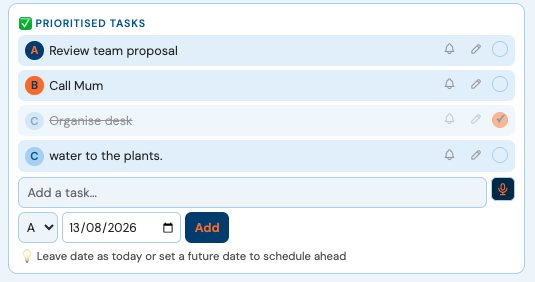
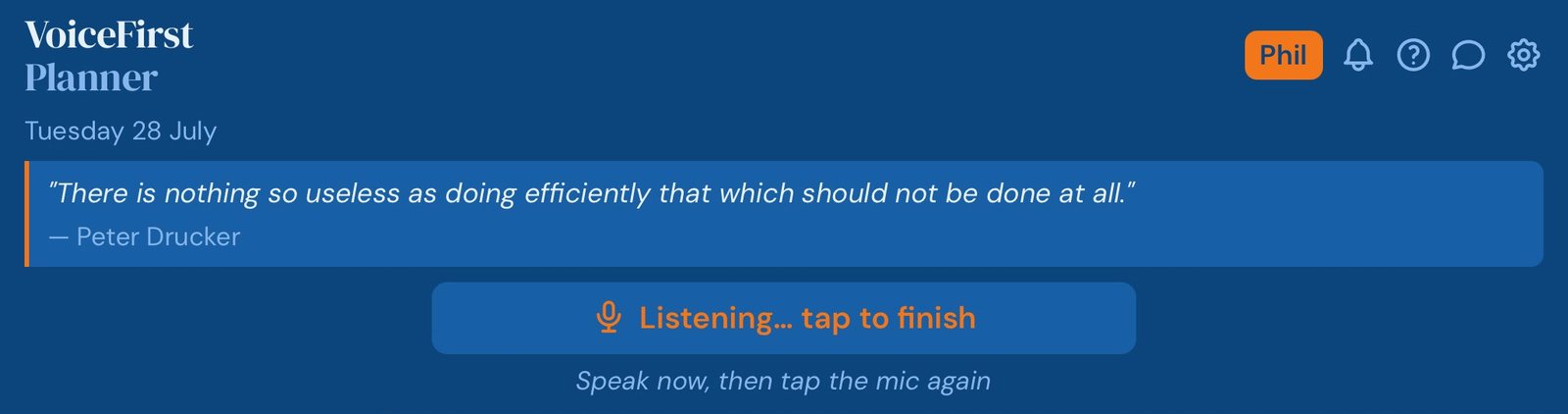
Tap the mic and talk. Tasks start with add and file themselves under the band you say — A for must, B for should, C for nice. Appointments take a cue word and a clock time. Your focus starts with my focus. Everything lands where it belongs, dated today unless you say otherwise.
“Add review the proposal as an A priority”
Top band, today, done — and you never opened a keyboard.
“My focus today is finishing the website”
Pinned to the top of the day, where you’ll see it every time you look.
Five daily tasks on the free plan, and every band is there from the start.
What the research found
Shoppers offered six options were far more likely to buy than shoppers offered twenty-four. Fewer choices, more action.
Three bands turn twenty things into the two that decide the day — and everything else waits without being forgotten.
Anything you don’t tick rolls to tomorrow on its own, wearing a quiet badge that says how long it’s waited. Not a telling-off — the reason you can put something down and trust it comes back. Retype nothing, lose nothing, and the badge tells you when something’s been waiting long enough to either do or delete.
What the research found
Unfinished goals kept intruding on people’s thoughts — but making a specific plan made the interference disappear.
It didn’t take finishing to quiet the mind. It took a plan. That’s what carry-forward is: the plan that keeps existing until you act on it.
A digital daily planner laid out like the paper one
The two-page spread you already know — except it fills itself in. The day on the left: focus, month, the prioritized list. Notes and the hour-by-hour schedule on the right. Thirty-five years of paper, and it opens at today, already carrying whatever you said this morning.
Planner view is iPad and desktop. On a phone you get Classic view, built for the smaller screen, holding the same day.
Daily Planning › Planner
The spread opens on today — filled in.
Thirty-five years I opened a paper planner at the same page every morning. The layout was never the problem — the pen was. Every appointment written twice, every unfinished job copied forward by hand, every list retyped into something else eventually.
The spread deserved better than the pen.
— Dave Rees, Founder. From boatbuilder, to business owner, to Founder.
How it works
How to plan your day in five minutes
Plan tonight, and tomorrow starts with a direction. Three steps.
Set one focus.The single thing that would make tomorrow a win. Say it; it pins to the top.
Speak the tasks as they occur to you.Bands sort the important from the loud. No order needed — that’s the planner’s job.
Block the must-dos.Say the time and it’s on the schedule. Everything else flows around them.
It works as a daily planner for work and for everything else — work’s calendar comes in one way, and nothing you do here ever changes your work calendar.
Daily planner questions
How do I plan my day?
Set one focus, list the tasks in priority order, block the fixed times, and plan tomorrow the night before. Five minutes is enough.
What should a daily planner include?
One focus, a short prioritized task list, the day’s schedule, room for notes, and a way to carry forward whatever didn’t get done.
Is VoiceFirstPlanner a free daily planner app?
It is free to start, with no card. The free plan includes five daily tasks, and every band is there from the start. Premium takes every limit off.
Can I use it as a daily planner for work?
Yes. Bring your work calendar in by file and tick what enters — one-way, so nothing you do here ever changes your work calendar.
Plan today in the time it takes the kettle to boil.